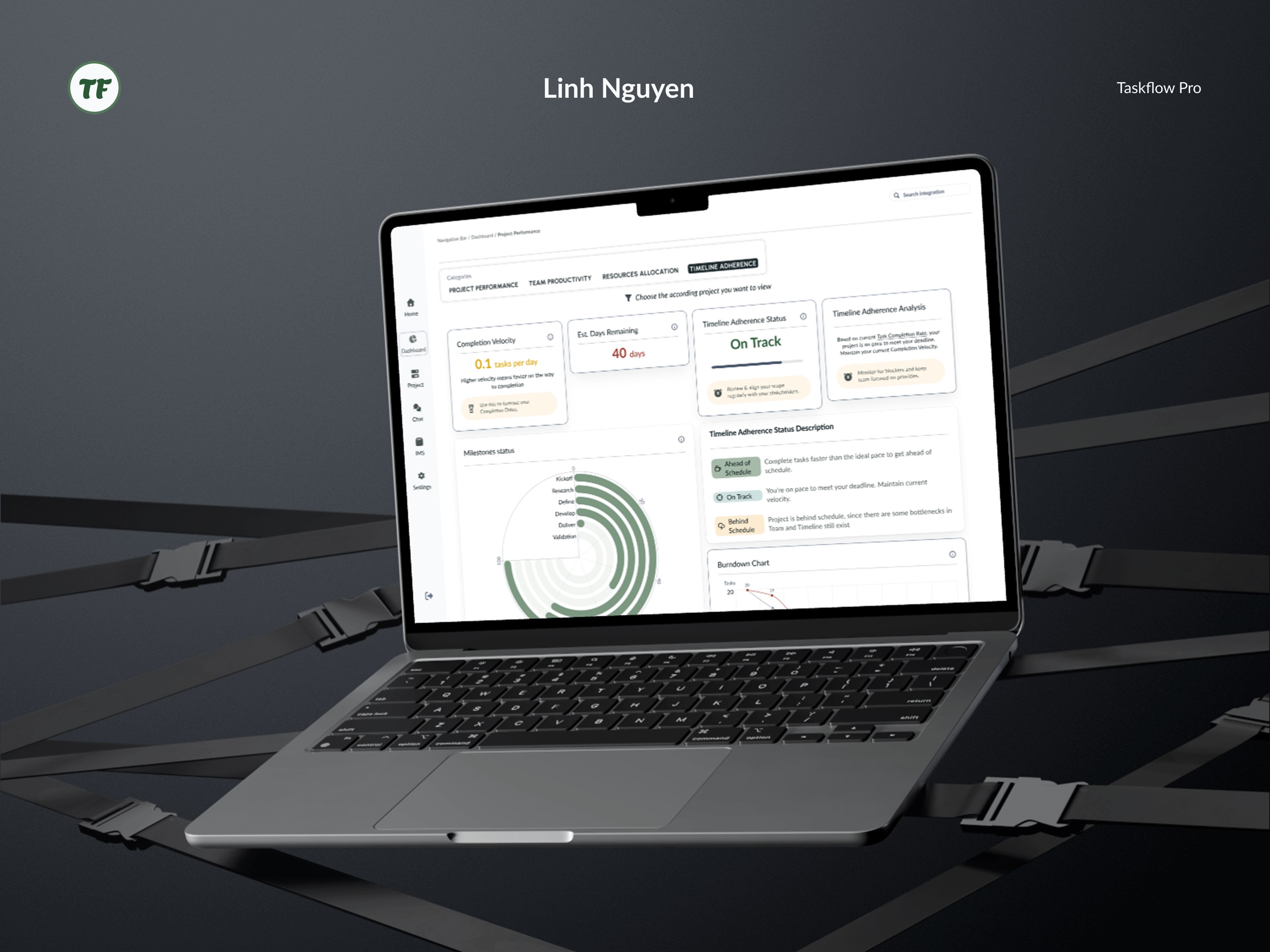
ROLEUX/UI Designer, Information Architect TOOLSFigma, Figma Make, Claude AI TIMELINENovember 2025 PARTNERSolo Project | PROBLEM STATEMENTSHow can a Workflow & Management platform help increase performances of mid-sized companies?PRODUCT INTRODUCTIONTaskFlow Pro is an all-in-one project management platform that unifies communication, task management, & information management system in one intelligent workspace. FRAMEWORK USED
| |
OVERVIEW
PRODUCT CHALLENGES
I began with researching on finding out why there are so many platforms out there already, yet new teams of 5-10 members still struggle with onboarding the team and forming working dynamic, included:
Lost information across platforms
Missed deadlines due to poor visibility
Wasted time searching for files and updates
Lack of accountability on task ownership
Difficulty tracking project progress for managers
From there, I categorize on which problem that this new platform can encounter and which are out of scope
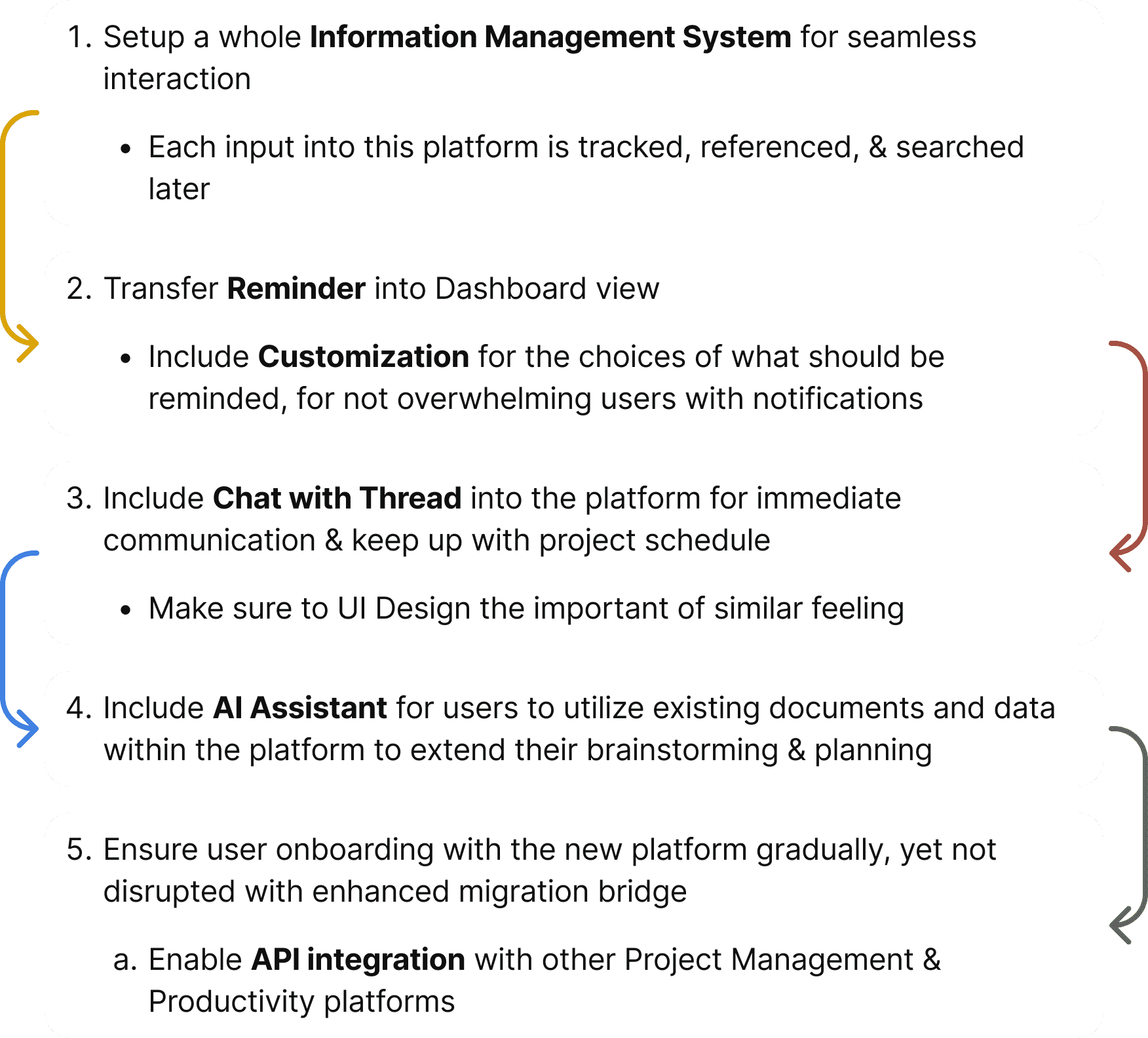
PROJECT TASKS
Some main jobs are set out to finish this project smoothly
INFORMATION ARCHITECTURE
PRODUCT CHALLENGES
HOME | DASHBOARDS | SETTINGS | CHAT | PROJECT MANAGEMENT | INFORMATION MANAGEMENT SYSTEM | ONBOARDING |
|---|---|---|---|---|---|---|
Navigation Bar | Project Performance | Profile Management | Threads | Menu Bar | IMS Process | Getting Started |
Reminder | Team Productivity | API Integrations | Chatbox | View Customization Bar | IMS Method | Guidance Overlay |
Customization View | Resources Allocation | Billings/ Upgrade Plan | Connection | IMS Products | ||
Timeline Adherence | Timeline Adherence | Help Center | AI-powered Assistant |
PRODUCT FEATURES
DASHBOARD
Transforming Project Oversight Through Intelligent Dashboards
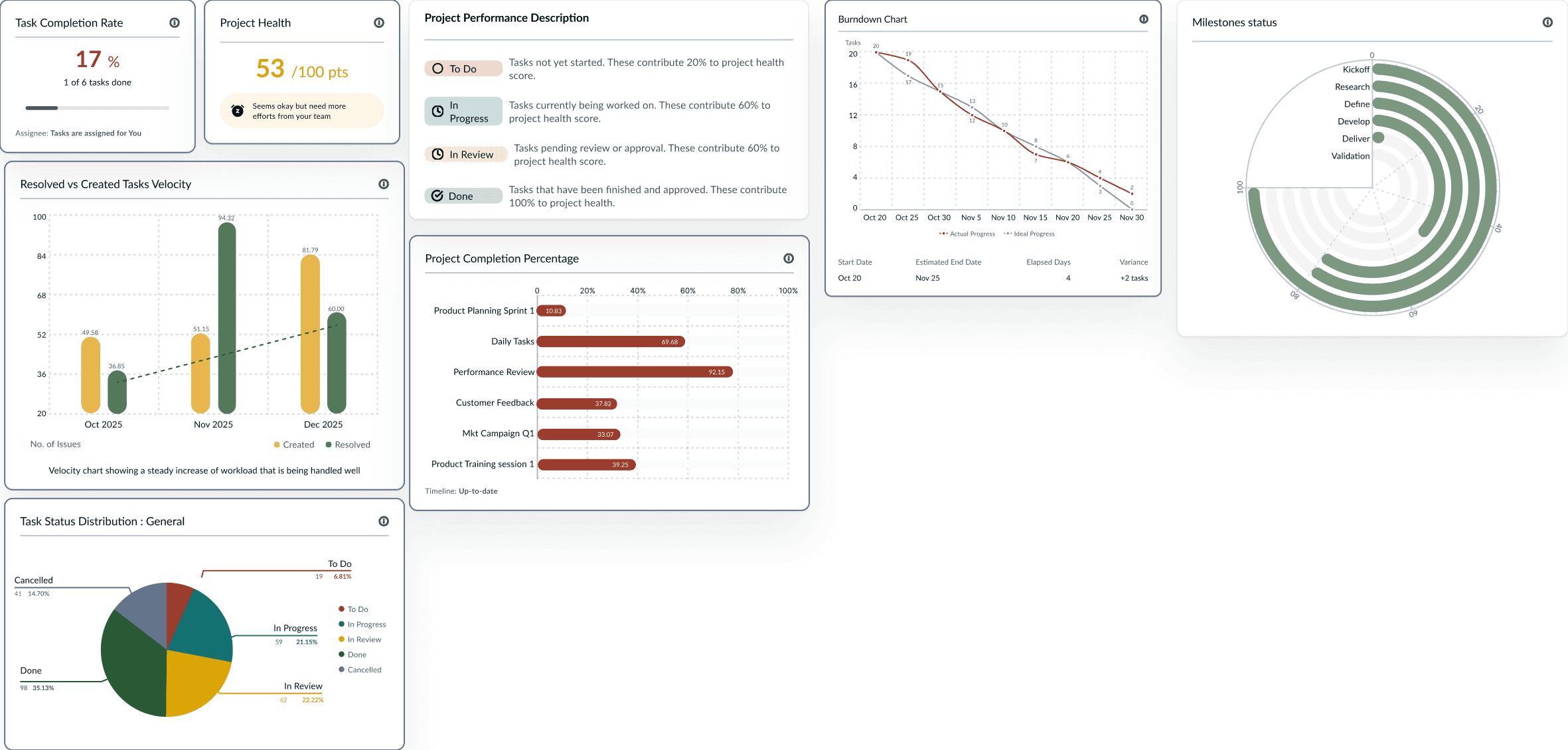
The dashboard provides real-time visibility across 4 critical dimensions: Project performance, Team productivity, Resource allocation, Timeline adherence. With those visualization, managers can quickly identify bottlenecks, recognize achievements, and make informed decisions without drowning in spreadsheets
Project Performance
How complete is each project?
Are we on track to finish on time?
How fast are we completing tasks?
Through visual indicators like Task completion rates, Health scores, & Velocity charts, teams gain immediate understanding of project status. while the Resolved versus Created tasks chart reveals whether the team is gaining ground or falling behind.
These insights help teams course-correct early, celebrate wins appropriately, and maintain realistic expectations with stakeholders.
Team Productivity
How productive is the team?
Who needs help/support?
Are we working efficiently?
Is quality maintained?
Understanding team dynamics requires more than counting completed tasks. The Team Productivity dashboard illuminates who needs support, who are worthy of recognition, whether quality is maintained, and how efficiently the team operates.
By monitoring workload distribution, managers can prevent burnout and ensure sustainable pace across the team.
Resource Allocation & Timeline Adherence
Are we on schedule?
Will we meet the deadline?
Which milestones are at risk?
2 views address resource management and schedule risks. The Resource Allocation perspective reveals who is overloaded, where resources are underutilized, and what obstacles impede progress. Meanwhile, Timeline Adherence tracking shows whether projects remain on schedule, which milestones face risk, and whether deadlines are achievable. Together, these dashboards enable proactive management—shifting resources before crises emerge and adjusting timelines based on real data rather than optimistic assumptions.
PRODUCT FEATURES
INFORMATION MANAGEMENT SYSTEM
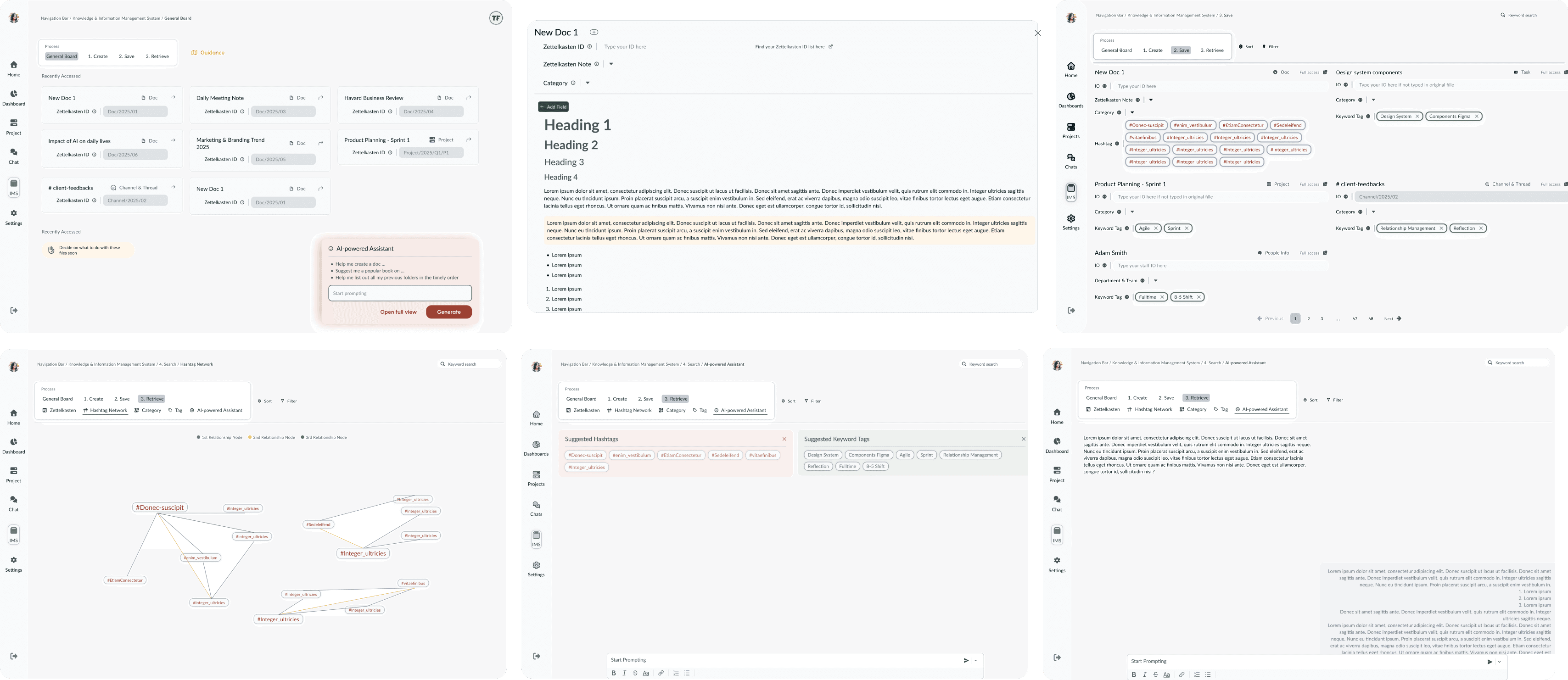
A comprehensive knowledge architecture that transforms how teams capture, organize, and retrieve information. The only Information Management System recognizes that project work generates countless documents, notes, and conversations—and that traditional folder structures often fail to surface the right information at the right time.
Process: Create, Save, Retrieve
We structured the entire system around 3 fundamental actions that mirror natural knowledge work.
Create phase helps users generate note-taking documents while seamlessly connecting them with external books, internal projects, tasks, and chat conversations.
Save phase eliminates organizational friction—the system guides users toward logical structures with minimal effort, preventing the "where should this go?" paralysis that plagues traditional systems.
Retrieve phase addresses what we identified as the most critical yet overlooked challenge: actually finding information when you need it.
Intelligent Organization Methods
Rather than forcing users into a single organizational paradigm, we built five complementary methods that accommodate different thinking styles and use cases.
Zettelkasten system | provides permanent identifiers for tracking items across the platform, ensuring references never break even as content evolves. |
Hashtag Network | creates flexible connections between related concepts, allowing teams to link documents organically without rigid hierarchies. |
Categories | establish clear organizational boundaries through primary groupings like Project Type, Department, or Status |
Tags | enable multi-dimensional classification where items carry multiple attributes simultaneously |
AI-powered assistant | ensure that information surfaces through search, browsing, suggestions, or conversational queries. |
PRODUCT FEATURES
API Integration
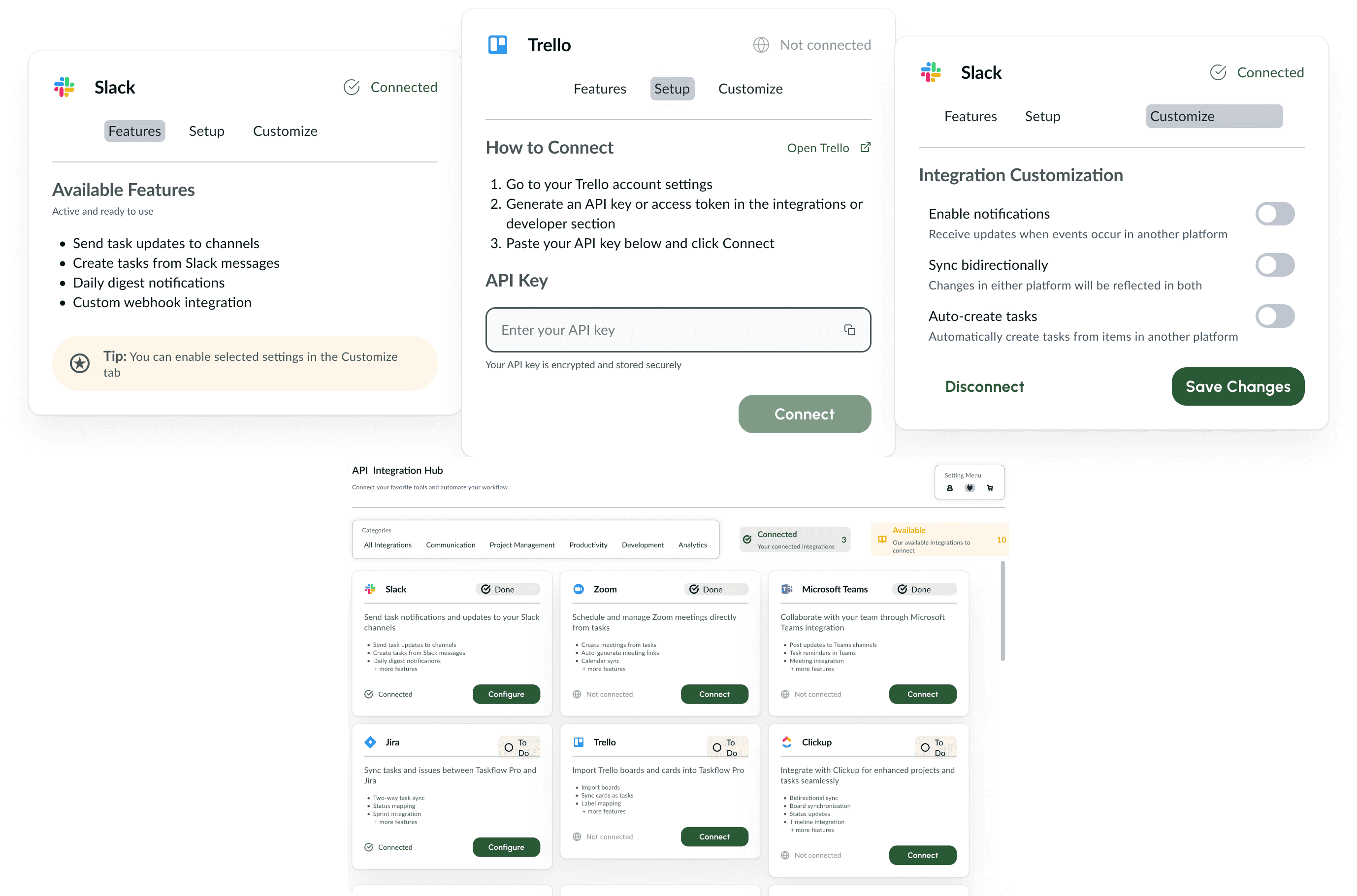
I developed a centralized integration hub that connects Taskflow Pro with the tools teams already use daily. Rather than forcing users to abandon their existing workflows, we built a bridge between platforms. The integration hub supports essential productivity tools like Slack, Zoom, Microsoft Teams, Trello, Asana, Jira, and more, enabling seamless data flow across the entire project ecosystem. This approach respects that modern teams operate across multiple platforms and need those tools to work in harmony rather than in silos.
Streamlined Connection Process
Each integration provides clear instructions—whether it's generating an API key from Trello, configuring a webhook URL for Slack, or authorizing access through OAuth
Flexible Feature Configuration
Users can select exactly which capabilities they want active—such as importing boards from Trello, syncing cards as tasks, or enabling two-way label mapping. For Slack, teams might choose to send task updates to specific channels, create tasks from messages, or receive daily digest notifications.
Smart Customization Options
Teams can enable or disable notifications based on their communication preferences, activate bidirectional syncing to keep data current across platforms, and set up auto-creation rules that reduce manual data entry.